
Subscribe to our Newsletter


Model No: CR-5314
Low Profile Ceiling Fan with Light rechargeable fan
Rechargeable Ceiling Fan
Product name: Rechargeable Ceiling fan
Model: CR-5314
Speed: Stepless speed fan
Size: 14 inch
Blade: 5 blade
Battery: 11.1V 2200mAh rechargeable battery
Color: accept customized
Max power 50W
LED : 56pcs led light
Product name: Rechargeable Ceiling fan
Model: CR-5314
Speed: Stepless speed fan
Size: 14 inch
Blade: 5 blade
Battery: 11.1V 2200mAh rechargeable battery
Color: accept customized
Max power 50W
LED : 56pcs led light
Delivery :
FOB,C&F,EXW
minimum order :
1000 pieces
Supply Ability :
2000pieces / Day
Stock Time :
30Day
Country of Origin :
China
Quantity :
US $18.50 - US $19.50
/ pieces
powerful ceiling fan, Rechargeable Ceiling Fan,Power Source:AC and DC,Color: White or Customized,Room Type:Office, Kids Room, Kitchen, Bedroom, Dining Room,Special Feature:Smart Control, Light Dimming, Stepless Speeds, Timing,rechargeable ceiling fan with led light,rechargeable ceiling fan,56pcs super bright led,Powerful Ceiling Fan with light,powerful ceiling fan
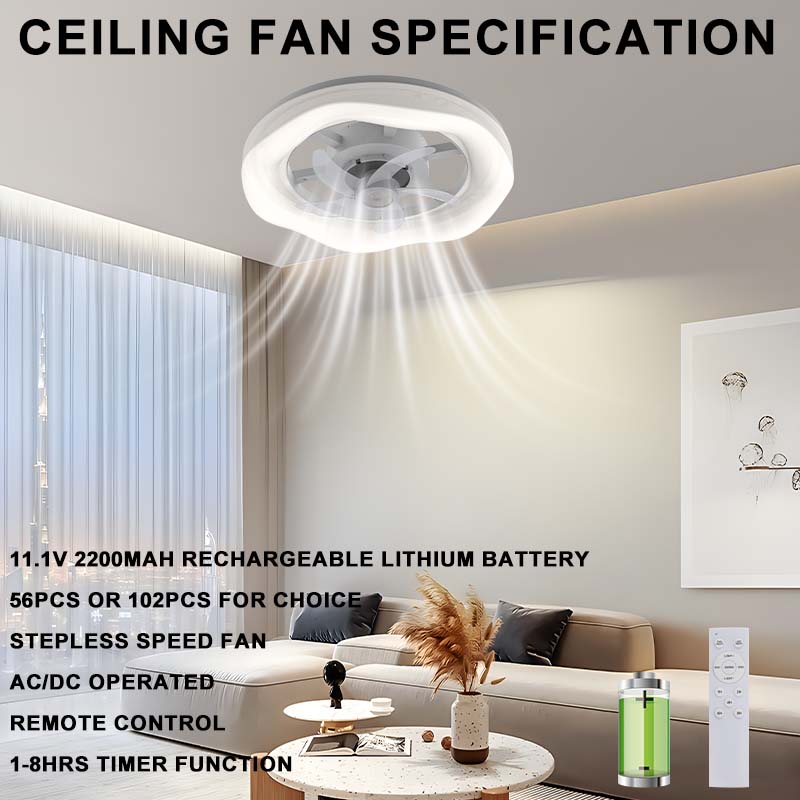
1.【Modern Design & Multi-Functional】5 wind speeds, 3000K-6500K color temperature change, stepless dimmable, reversible wind, timer setting, remote control. This modern ceiling fan with light can fully save your space while adding the stylish sense of space.
2.【Color Temperature & Stepless Dimming】The fan light has 3 color lighting modes that can be controlled by remote, ranging from warm(3000K) to clear white(6500K). You can easily customize the brightness from 10% to 100%, allowing you to adjust the led ceiling fan from dark to bright.
3.【6 Wind Speeds & Quiet Fan】Our 5 blade fan for bedroom provide 5 wind speeds, anabling you to select the perfect airflow intensity for your comfort preferences. The motor produces less than 30dB of sound, suitable for a peaceful and comfortable sleeping environment.
4.【Timer】The low profile ceiling fan light can be set for 1-8 hours timer.
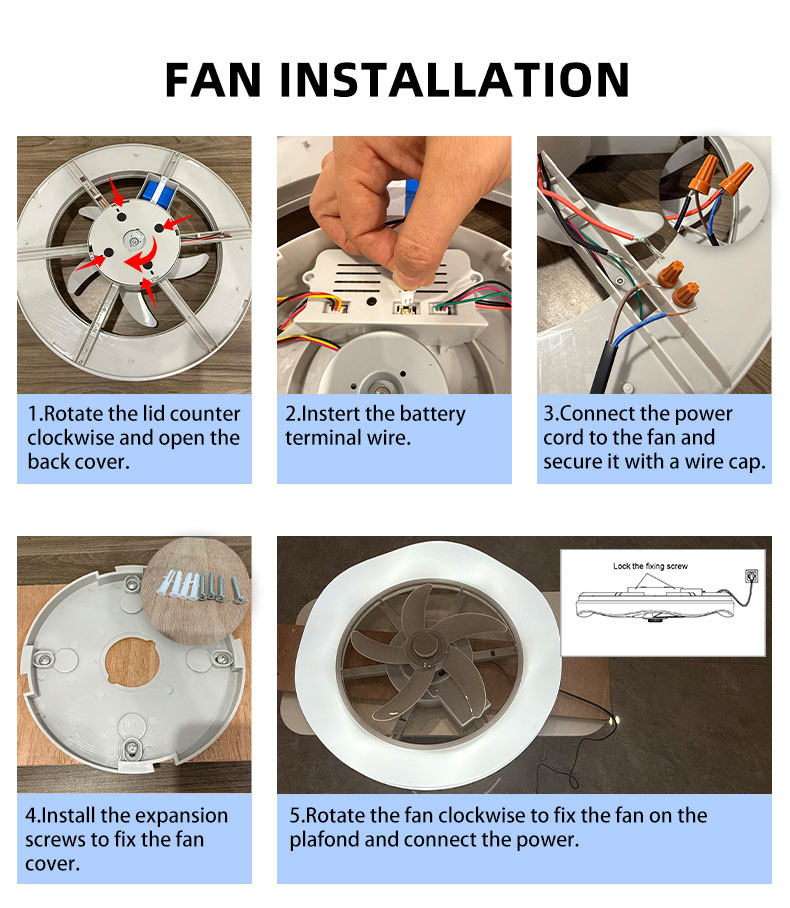
Easy Installation and Operation:
1.Rotate the lid counter clockwise and open the back cover.
2.Instert the battery terminal wire.
3.Connect the power cord to the fan and secure it with a wire cap.
4.Install the expansion screws to fix the fan cover.
5.Rotate the fan clockwise to fix the fan on the plafond and connect the power.
Remote Control Operation:
1.Before use, please insert two 7-cell batteries.
2.The fan and LED each have an independent ON/OFF control button (as shown in the figure
on the left).
3.The fan and LED have 5 speed levels each. Short press the"+"or"-"button on the remote to
adjust the fan speed and LED brightness. Long press the"+"or"-"button to achieve continuous
speed and brightness adjustment. Within 8 seconds, the speed and brightness can be adjusted
between levels 1-5 or 5-1. The HIGH/MIDDLE/LOW keys correspond to the fan speed and LED
brightness levels.
4.While the fan is operating, short press the"SWING"key on the remote to turn the oscillation
function ON/OFF.
5.While the fan is operating, short press the"TIMER"key on the remote to set the fan's timer.
The timer options are 1 hour, 2 hours, 4 hours, 6 hours, and 8 hours, each corresponding to a
specific timer key.
6.When the AC power is connected, the LED will light by default, with the brightness set to level 3.
7.When the remote control is not in use for an extended period, please remove the batteries.
2.The fan and LED each have an independent ON/OFF control button (as shown in the figure
on the left).
3.The fan and LED have 5 speed levels each. Short press the"+"or"-"button on the remote to
adjust the fan speed and LED brightness. Long press the"+"or"-"button to achieve continuous
speed and brightness adjustment. Within 8 seconds, the speed and brightness can be adjusted
between levels 1-5 or 5-1. The HIGH/MIDDLE/LOW keys correspond to the fan speed and LED
brightness levels.
4.While the fan is operating, short press the"SWING"key on the remote to turn the oscillation
function ON/OFF.
5.While the fan is operating, short press the"TIMER"key on the remote to set the fan's timer.
The timer options are 1 hour, 2 hours, 4 hours, 6 hours, and 8 hours, each corresponding to a
specific timer key.
6.When the AC power is connected, the LED will light by default, with the brightness set to level 3.
7.When the remote control is not in use for an extended period, please remove the batteries.


